Service costing is an important element for many organizations operating within the service space, and there can be many moving parts, such as multiple Parts, Purchase Orders, and Personal involved to fulfill a service request. Below is an overview on how Legendary Supply Chain holds and recognizes some of those costs.
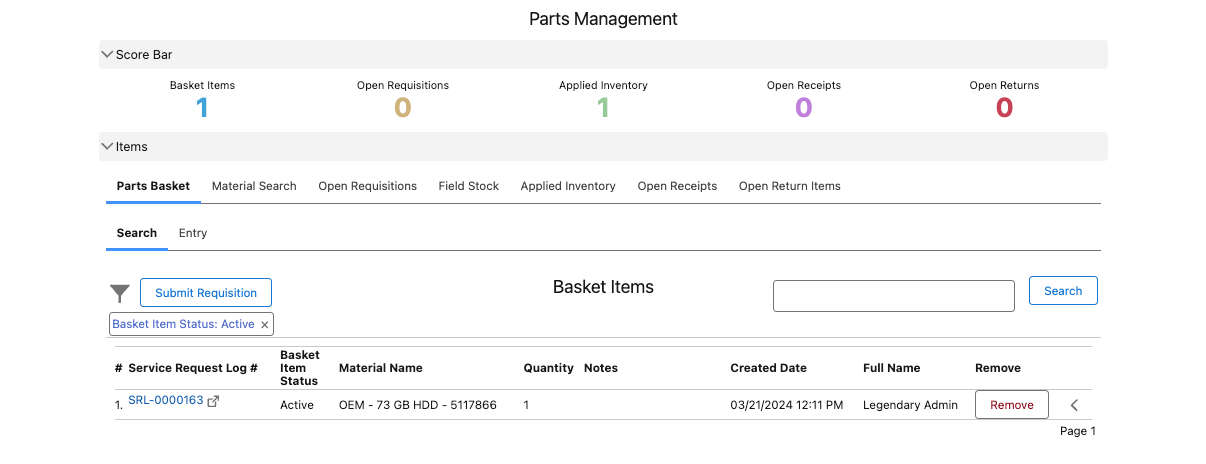
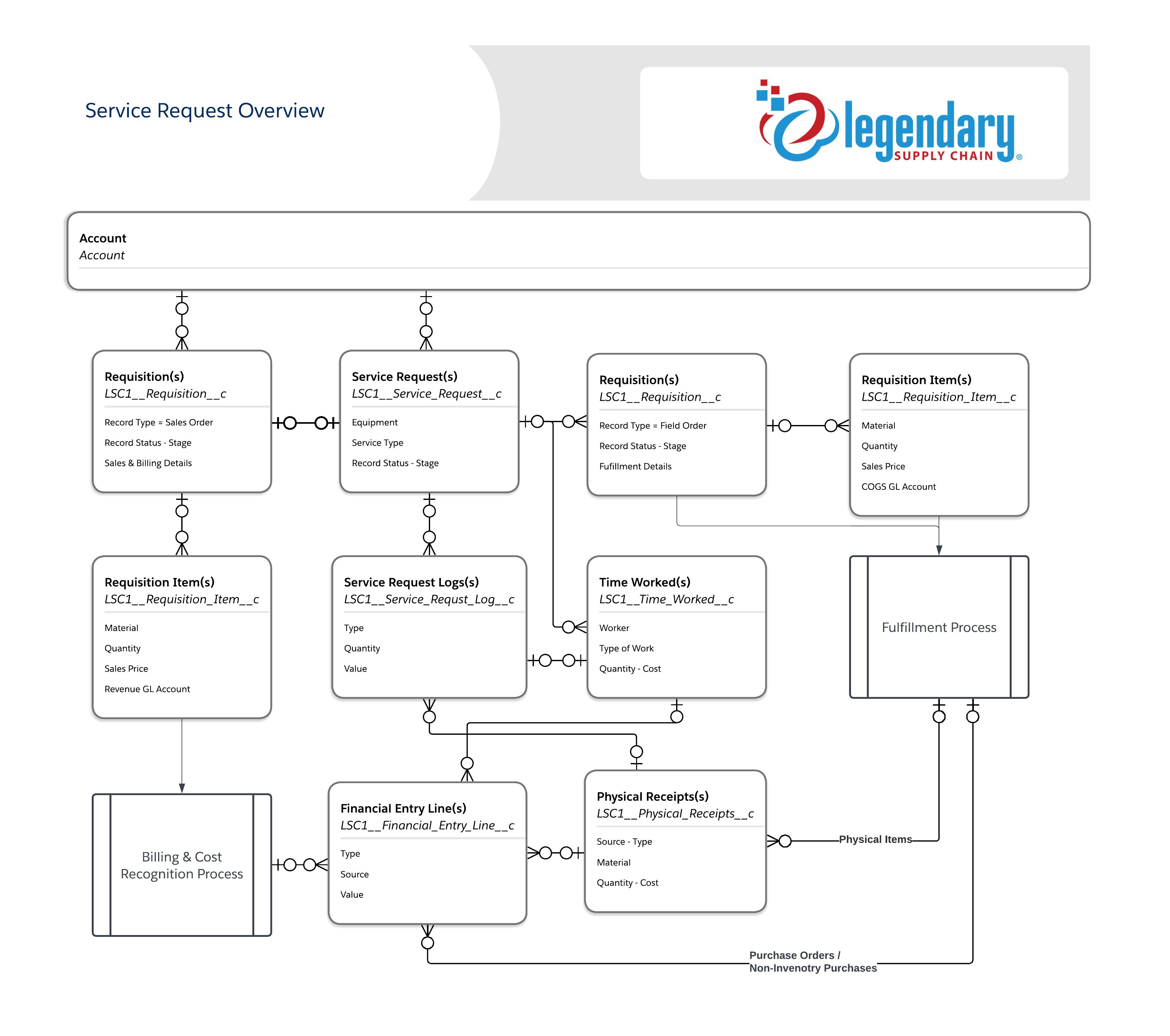
Every Service Request will result in a parallel Requisition of type Sales Order, and this Sales Order is a one-to-one relationship with the Service Request. This is the revenue container as many organizations invoice in such a way that is not an exact match to their line item costing. For example, Service Company A is going to install a new unit and they are going to bill a flat rate of $4,500 so the invoicing is easy and straight forward, but on the fulfillment side we actually consumed 10 records of inventory and 2 employees working on the service event across 2 days, so we have 10 inventory application events and 4 time worked entries at least for 2 employees performing 2 days of work. This will result in 1 revenue line but 14 cost lines. Other organizations may bill the exact line items of cost, but either scenario needs to result in those costs being tracked and recognized associated to those Service Requests.
Below is a basic workflow some service organizations may follow throughout the course of a service event.
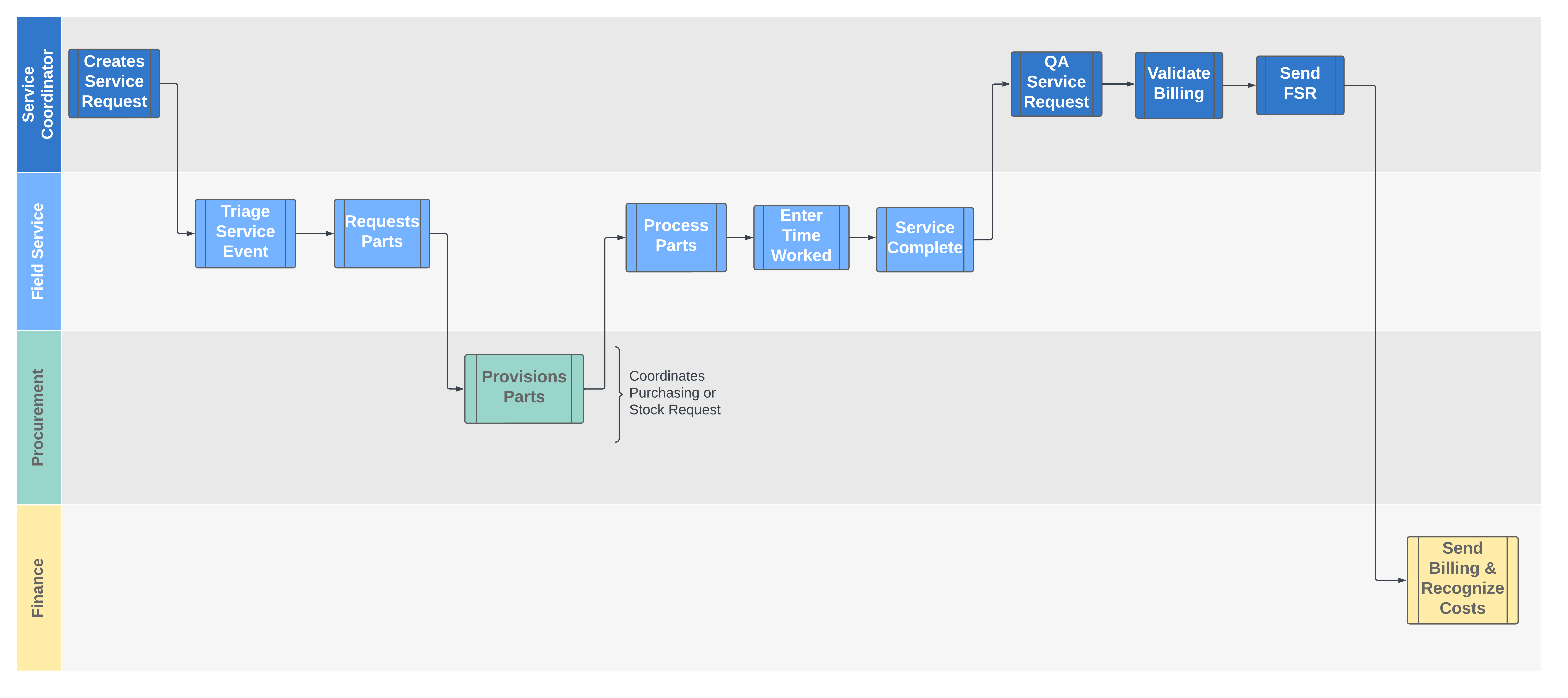
Service Request Creation
When a service Request is created, this will also create the parallel Requisition of Type Sales Order. This sales order will not create with any line items, but they will be added with custom automation or prior to billing the service event.
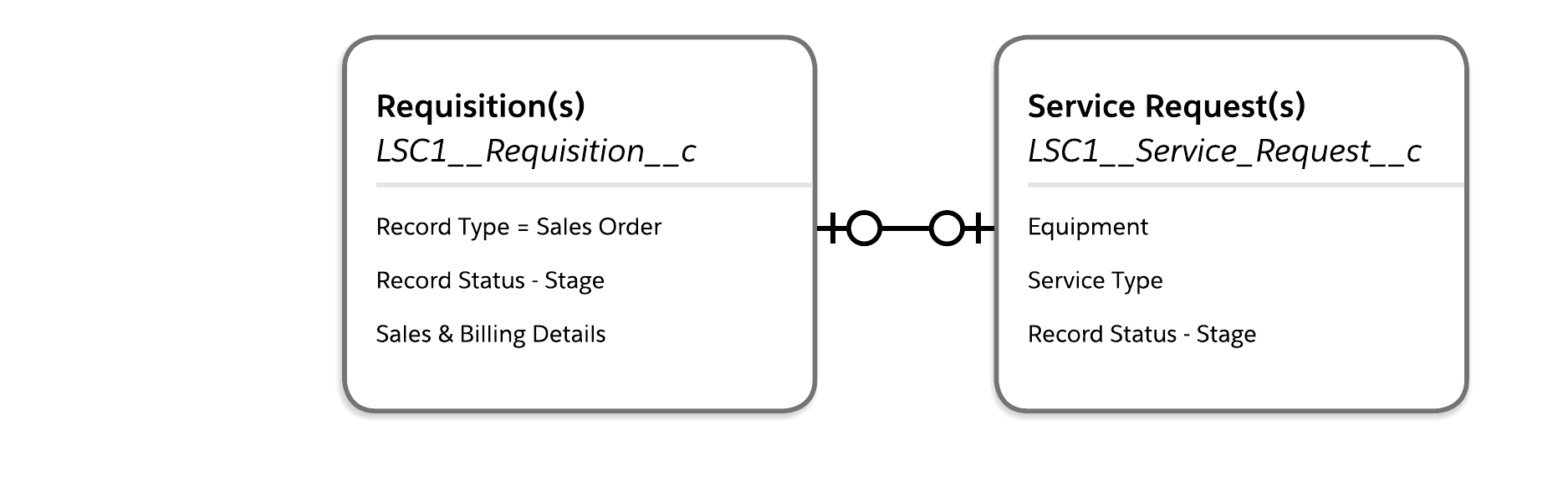
Parts or Service Requests
When parts or service are needed for a Service Request, the items will be requested via the Parts Management Interface and the procurement team will then fulfill the requests with inventory from stock or purchased from a vendor via a PO. When a purchased service is requested the procurement team will provision via a purchase order or engaging an additional internal resource.
After the Requisition is submitted from Parts Management, this will result in a child requisition for which costs will accumulate as a container until the Sales Order has been billed and costs recognized.
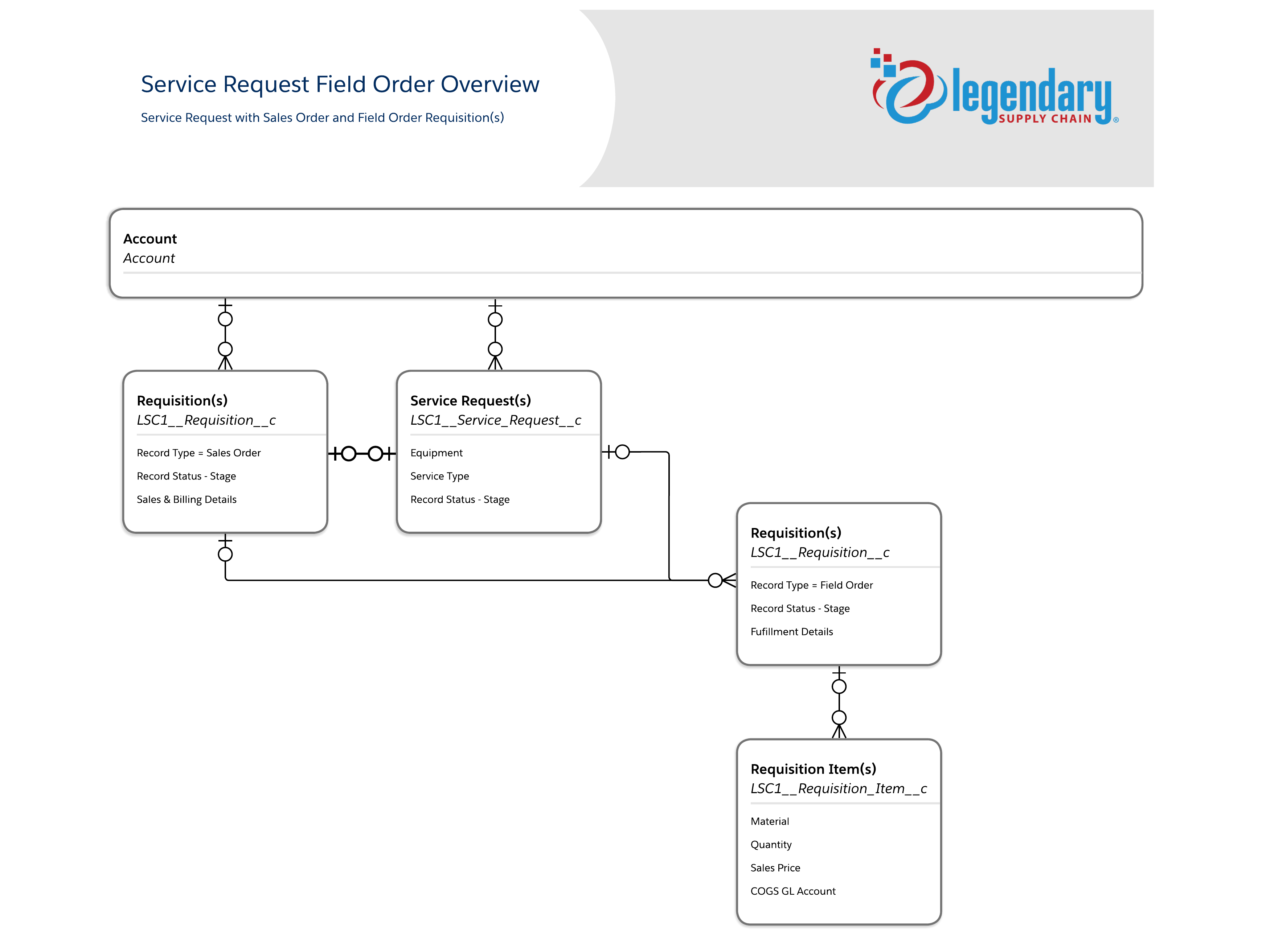
There can be multiple Requisitions of type "Field Order" associated as a child record to the Service Request which will also inherit the parental relationship to the linked Sales Order. The Field Order is set to Completion Type of "Parent Requisition", which means that when the Financial Entry Status on the Sales order is changed to posted, which will recognize the costs on the associated, it will also update the Financial Entry Status on the Child Requisitions of Completion Type "Parent Requisition" to recognize any costs associated as well. The Sale Order, Service Request, and Field Order requisitions are viewed as a group when it comes time to Bill and recognized the associated costs.
Recognition
After the Field Order(s) are processed, the PO Lines will need to be completed and received for all service scenarios, and the Physical Receipts for validation of inventory usage will need to be processed. In addition, any time worked should be associated and posted (if desire is to have costs recognized financially) on the Service Request. All of these items: PO Line Item Purchase Receipt for non-inventory items, Physical Receipt Completion, and Time Worked are the avenues of aggregating costs onto a Service Requests. These items can be validated as complete prior to closure of the documents using the Legendary Setup -> Legendary Settings -> Service Request Settings & Requisition Settings. In these settings, the records can be configured to validate the associated child records have been complete prior to closure of the Requisition or Service Request in addition to standard validation rules. It is a best practice that the Service Request, and Field Orders all be closed prior to recognition or billing.
Next the Service Request and associated documents are recognized the system will find any associate items posted into a "WIP Billing" GL Accounting, which is a field on the Chart of Accounts record and established in settings, via Financial Entry Lines and then recognized those items to their corresponding COGS accounts, which are defined on the
associated record of either the Requisition Item or Time Worked record. Further automation of GL Accounts can be found in Legendary Setup -> Setup or Legendary Setup -> Legendary Settings -> Financial Mappings for advanced GL Mappings.
Below is a schema diagram of many of the core relationships, and a breakdown of GL Accounts and recognition. *Note: GL Accounts are just examples and may not match exact GL Accounts in every environment or implementation.
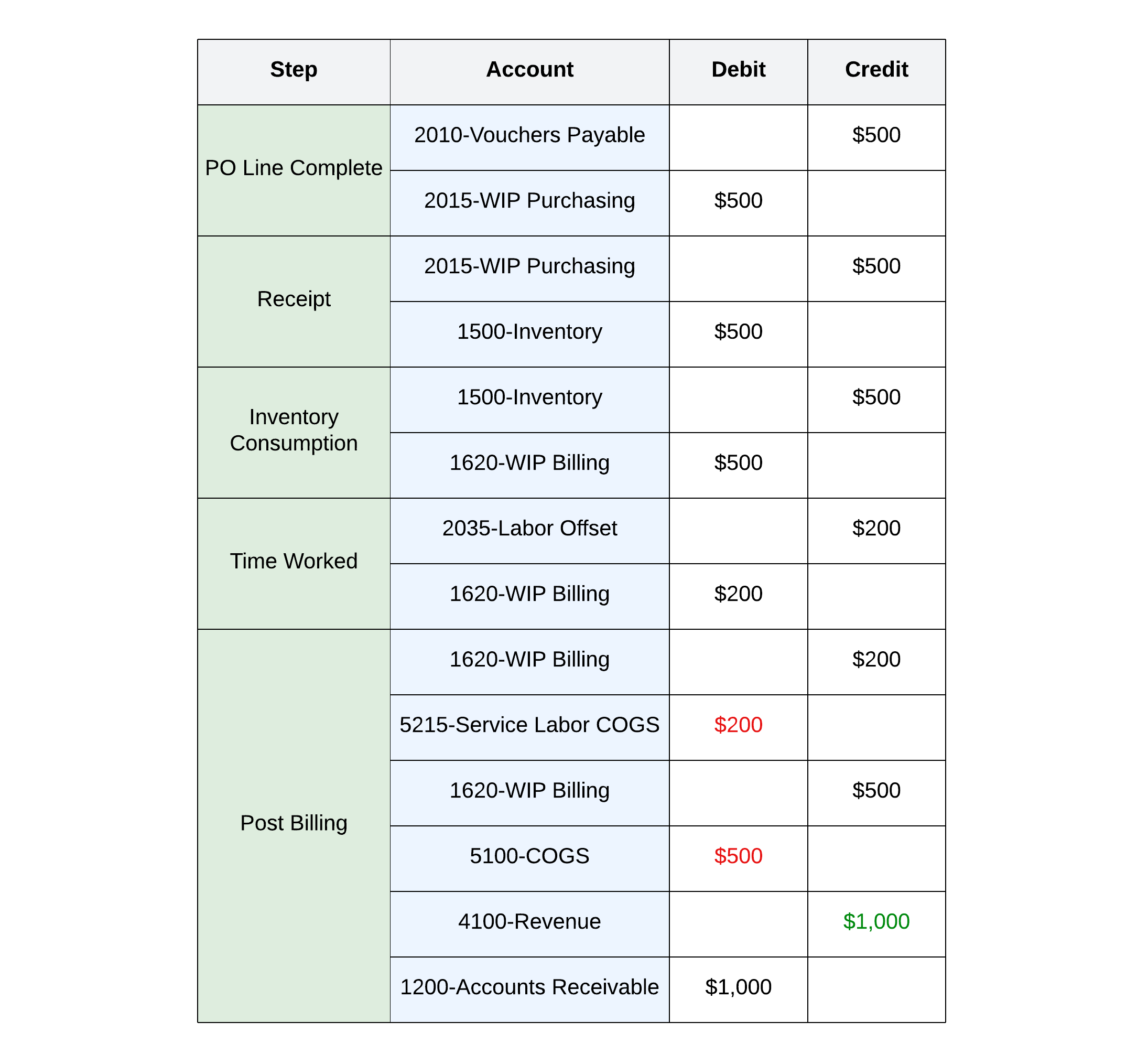
The below example is a Service Request with an inventory item drop shipped via a Purchase Order for $500 and $200 worth of internal labor on a Service Request that is billing for $1,000 dollars, resulting in $300 of margin.
See what the momentum is built on.
Legendary Supply Chain runs your whole operation on one Salesforce-native platform. See it on your data.
Book a demo